POS system for minimarkets in Panama: what it must have (2026 guide)
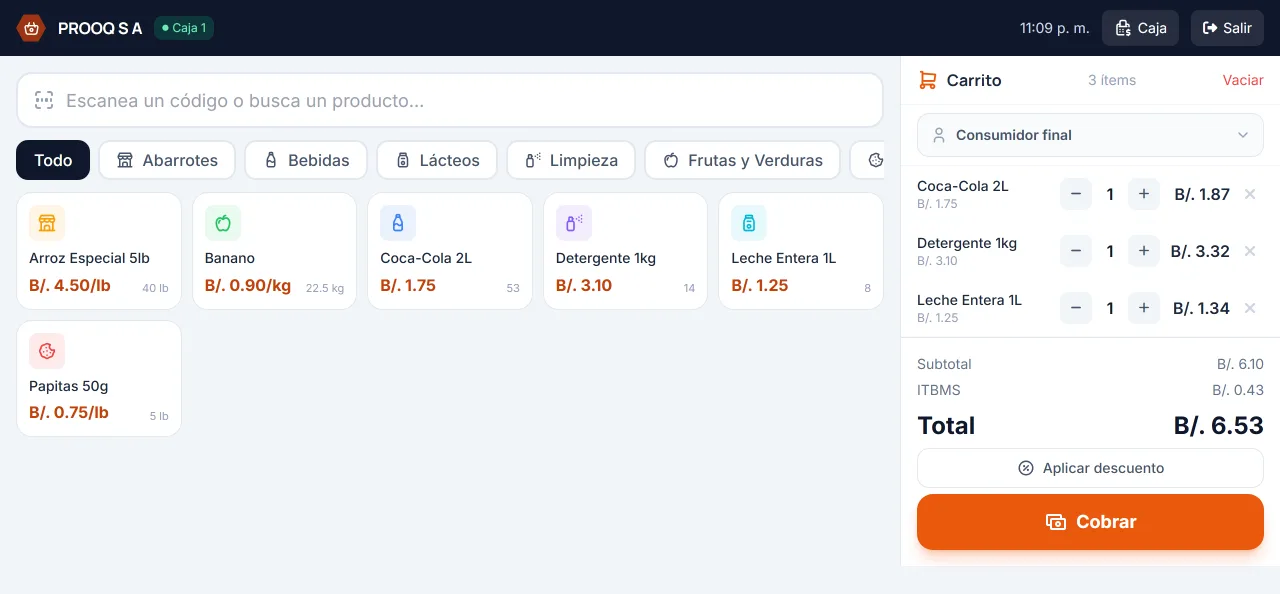
A minimarket lives on two things: keeping the line moving and keeping the margin from evaporating. Sounds simple. But between the neighbors’ store credit, stock quietly expiring in the back room and a register that never quite balances, what looked like a good month ends up being a tight one. A good point-of-sale system won’t bring in sales on its own, but it will keep you from losing money on the sales you already made. This guide covers what it should have and what to ask before you buy.
A day at a minimarket: where the money leaks out
A normal shift mixes customers with three items and customers with a full cart, products sold by weight, someone who “will pay on Friday”, a supplier dropping off stock, and a cash close that has to come out exact. The leaks are rarely some big theft. They’re the yogurt that expired, the credit nobody wrote down, the product whose cost went up while you kept selling it at the old price.
What the system must have
- Fast barcode checkout. Scan, total and charge without hunting around the screen. If the cashier has to type in prices, the line gets longer and mistakes creep in.
- Sale by weight. Deli, fruit, vegetables: the scale’s label carries the weight inside the barcode, and the system should read it as-is, with nobody recalculating by hand.
- Store credit under control. Credit should be just another payment method, with partial payments, a balance per customer and aging. The notebook next to the register won’t tell you who has owed you money for three months.
- Register with opening, count and shift close. Starting float, cash movements, expected versus counted, and a summary when the shift ends. Without this, you don’t know if it balances.
- Inventory with lots and expiry dates. It should tell you what expires first and make sure that’s what goes out first (FEFO). In groceries and refrigerated goods, this is pure margin.
- Purchases that update cost. When stock arrives, the new cost goes into the system. Otherwise your profit reports are fiction.
- Built-in DGI electronic invoicing. The receipt should come out as a valid tax document, without moving the sale into another program.
- Per-cashier permissions. Voids and returns should need authorization instead of being something anyone can do from the register.
Store credit: the biggest leak if you don’t measure it
In a Panamanian neighborhood store, credit isn’t going away, and it doesn’t have to. Handled well, it keeps customers coming back. The problem is not knowing how much money is out there. A system that records credit as a payment method lets you see each customer’s balance, apply payments and pull a statement when it’s time to collect. Always ask: can I find out today, in one minute, how much I’m owed and since when?
Expiry and shrink: what you lose quietly
An expired product is a double loss: you don’t get paid for it and you already paid for it. Tracking lots with expiry dates and selling whatever expires soonest first turns a problem you’d never see into an alert you get in time. Hardly anyone asks for this when buying a system, and six months later it’s one of the features people are most glad to have.
E-invoicing should come built in
In Panama, DGI electronic invoicing is already part of daily business (we cover it in depth in our guide to DGI electronic invoicing). For a minimarket, what matters is that the system is already connected to a PAC and that the receipt prints with its CUFE and QR from the same thermal printer at the register. If you have to export sales and re-upload them into another program, you’ll lose time every single day.
In the store or in the cloud?
Both work, so it’s worth thinking it through. In the store, the system runs on a local machine, and if the internet goes down you keep selling. In the cloud, you can log in from anywhere and backups don’t depend on you, but you need a stable connection during business hours. Neither one is better across the board. It depends on how reliable your internet is and whether the owner needs to check sales without driving to the store.
HUB Market: built for the Panamanian minimarket
At SuiteHub we built HUB Market with this exact list in mind. It’s our vertical for minimarkets and small supermarkets, with one store and several registers:
- Barcode POS with a touch cart, mixed payment and sale by weight.
- Store credit with partial payments, aging and a per-customer statement.
- Inventory with stock ledger, lots and expiry dates, plus purchases that update cost.
- Register with cash count and close, and the shift summary sent by email.
- Returns that require authorization, and detailed role permissions for cashiers.
- DGI e-invoicing: the receipt prints as a CAFE with CUFE and QR, on 80 or 58 mm thermal paper.
You can install it in the store or in the cloud, whichever suits you, and it’s available starting with the Core edition. Details are on our pricing page.
Want to see it with your own inventory? Book a demo on WhatsApp and we’ll show you HUB Market running, no strings attached.
Want to see how it would work for your business?
Message us on WhatsApp, tell us how you work, and we'll tell you which edition fits.
Talk to sales